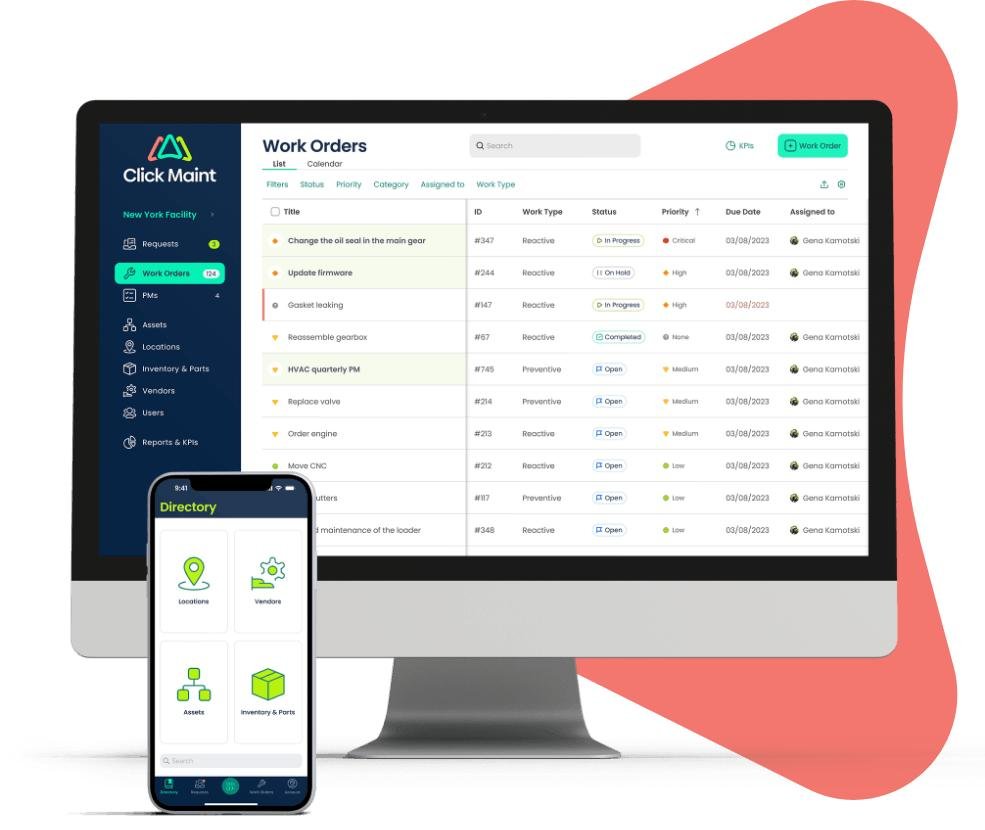
Work Order Management Software
Running a business involves many daily tasks. When work orders are handled with paper forms, spreadsheets, or handwritten notes, mistakes can happen. Jobs may be delayed, information can get lost, and customers may become frustrated.
This is why many companies use work order management software. These tools help businesses organize work requests, assign tasks, track progress, and keep important records in one place.
Whether you operate a maintenance company, HVAC business, plumbing service, electrical company, landscaping business, or property management firm, work order software can help improve daily operations.
In this guide, you will learn what work order management software is, how it works, its benefits, and what features to look for when choosing a solution for your business.
What Is Work Order Management Software?
Work order management software is a digital system designed to create, organize, assign, and track work orders.
A work order is a document that describes a task that needs to be completed. The task may involve repairs, maintenance, inspections, installations, or service requests.
Instead of using paper forms or multiple spreadsheets, businesses can manage all work orders through one system.
The software allows managers, technicians, and office staff to stay connected and view updates in real time.
How Work Order Management Software Works
Most systems follow a simple workflow.
A customer, employee, or manager submits a work request.
The software creates a work order.
The assigned worker completes the task and updates the status.
The completed work order is stored for future reference.
The process helps businesses stay organized and avoid missed tasks.
Basic Work Order Workflow
| Step | Action |
|---|---|
| Request Submitted | A service request enters the system |
| Work Order Created | A new task is generated |
| Assignment | Work is assigned to a technician |
| Job Progress | Updates are recorded |
| Completion | Task is finished |
| Record Storage | Information is saved for future use |
Why Businesses Use Work Order Management Software
Many companies struggle with scheduling and tracking work.
Paper-based systems often create unnecessary problems.
Common challenges include:
- Lost paperwork
- Missed appointments
- Poor communication
- Delayed updates
- Incomplete records
- Billing mistakes
Using work order management software helps reduce these issues by providing one organized platform for managing tasks.
Key Benefits of Work Order Management Software
Businesses of all sizes can benefit from digital work order systems.
Better Organization
All work orders are stored in one location.
Managers can quickly find customer information, service history, and job details.
Faster Job Scheduling
Assignments can be made within seconds.
Technicians receive updates immediately.
Improved Communication
Office staff and field workers can stay connected.
Everyone can view the latest information about a job.
Better Customer Service
Customers appreciate quick responses and accurate updates.
Faster service often leads to higher satisfaction.
Accurate Record Keeping
Completed work orders remain available for future reference.
This helps businesses track maintenance history and service records.
Features to Look for in Work Order Management Software
Not all software solutions offer the same features.
The best systems include tools that improve efficiency and simplify daily operations.
Important Features
| Feature | Purpose |
| Work Order Creation | Creates new service requests |
| Scheduling Tools | Assigns jobs efficiently |
| Mobile Access | Allows technicians to work remotely |
| Status Tracking | Shows job progress |
| Customer Database | Stores customer records |
| Reporting Tools | Tracks business performance |
| Notifications | Sends alerts and reminders |
| Document Storage | Keeps records organized |
Choosing the right features depends on your business needs.
Small Business Work Order Management Software
Small businesses often have limited staff and budgets.
This makes organization even more important.
Good small business work order management software helps owners manage daily operations without hiring additional administrative employees.
Small business owners often use software for:
- Scheduling service calls
- Tracking customer requests
- Managing employee assignments
- Creating invoices
- Recording completed jobs
The right software can save valuable time and reduce manual work.
Benefits for Small Businesses
| Benefit | Impact |
| Time Savings | Reduces paperwork |
| Lower Costs | Improves efficiency |
| Better Scheduling | Prevents missed appointments |
| Faster Billing | Speeds up payment collection |
| Improved Customer Experience | Increases customer satisfaction |
For growing businesses, software often becomes an important tool for long-term success.
Industries That Use Work Order Management Software
Many industries rely on work order systems every day.
Examples include:
- HVAC companies
- Plumbing businesses
- Electrical contractors
- Property management firms
- Manufacturing facilities
- Maintenance departments
- Cleaning services
- Landscaping companies
- Construction firms
- Equipment repair companies
Any business that manages service requests can benefit from digital work order tracking.
Mobile Work Order Management
Modern workforces spend significant time outside the office.
Field technicians need access to information while working at customer locations.
Mobile access allows workers to:
- View assignments
- Update job status
- Upload photos
- Record notes
- Capture signatures
- Complete reports
This reduces delays and improves communication between office staff and field teams.
Best Work Order Management Software Features for Growing Companies
Businesses often search for the best work order management software when operations become more complex.
As companies grow, they need additional tools to support larger workloads.
Advanced features may include:
- Multi-location management
- Automated scheduling
- Inventory tracking
- Asset management
- Customer portals
- Performance reporting
- Technician tracking
These features help businesses scale efficiently while maintaining service quality.
Work Order Management Software QuickBooks Integration
Many companies already use accounting software for financial management.
This is why work order management software QuickBooks integration is a popular feature.
Integration helps connect service operations with accounting processes.
Benefits may include:
- Automatic invoice creation
- Customer record synchronization
- Payment tracking
- Reduced data entry
- Improved accuracy
Businesses can save time by eliminating duplicate work between systems.
Benefits of QuickBooks Integration
| Advantage | Description |
| Faster Invoicing | Creates invoices quickly |
| Reduced Errors | Less manual data entry |
| Better Financial Tracking | Improves visibility |
| Time Savings | Streamlines workflows |
| Improved Accuracy | Keeps records consistent |
Many service-based businesses consider integration a valuable feature when evaluating software options.
Also check – Work Order Management Software: Streamline Maintenance and Service Operations
How Work Order Software Improves Productivity
Instead of calling multiple people for updates, workers can view everything in one system.
Examples of productivity improvements include:
- Faster job assignment
- Reduced paperwork
- Better communication
- Quicker customer response times
- Improved scheduling
When employees work more efficiently, businesses often serve more customers without increasing overhead costs.
Common Mistakes to Avoid When Choosing Software
Selecting software is an important decision.
Many businesses focus only on price and overlook other factors.
Avoid these common mistakes:
Choosing Software Without Mobile Access
Field employees often need information on the go.
Mobile access is important for most service businesses.
Ignoring Ease of Use
Complicated systems can create frustration.
Choose software that employees can learn quickly.
Overlooking Customer Support
Reliable support can save time when issues occur.
Not Considering Future Growth
Your software should support future business expansion.
Planning ahead helps avoid switching systems later.
How to manage Work Order Management Software
Every company has different needs.
Before making a decision, consider:
- Business size
- Number of employees
- Industry requirements
- Budget
- Mobile needs
- Reporting requirements
- Accounting integration
Creating a list of priorities can help narrow your options.
The best solution is one that matches your workflow and supports future growth.
Future Trends in Work Order Management Software
Technology continues to evolve.
Work order systems are becoming smarter and more connected.
Future trends may include:
- Increased automation
- Improved mobile functionality
- Better reporting tools
- Enhanced customer communication
- Real-time updates
- Smarter scheduling systems
Businesses that adopt modern tools often gain an advantage through improved efficiency and customer service.
Frequently Asked Questions
What is work order management software?
Work order management software is a digital tool used to create, assign, track, and manage work orders from start to finish.
Who should use work order management software?
Businesses that handle service requests, maintenance work, repairs, or inspections can benefit from these systems.
What is the best work order management software?
The best work order management software depends on your business size, industry, budget, and required features.
Can small businesses use work order software?
Yes. Many providers offer small business work order management software designed specifically for smaller teams and budgets.
Does work order management software work with QuickBooks?
Many systems offer work order management software QuickBooks integration to simplify invoicing, accounting, and customer management.
Can technicians access work orders from mobile devices?
Most modern platforms provide mobile apps that allow technicians to access and update work orders while in the field.
Is work order management software difficult to learn?
Most solutions are designed to be user-friendly and can be learned quickly with basic training.
Conclusion
Managing service requests, repairs, inspections, and maintenance tasks becomes much easier with the right work order management software. These systems help businesses stay organized, improve communication, reduce paperwork, and deliver better customer service.
Whether you need small business work order management software, are researching the best work order management software, or want work order management software QuickBooks integration, choosing the right platform can improve efficiency and support long-term business growth. By investing in a reliable system, businesses can save time, reduce errors, and create a smoother experience for both employees and customers.